
MICROSOFT 365 AUTOMATION ASSESSMENT
Find the manual work worth automating first
Your team may already use Microsoft 365 every day while approvals, onboarding, reporting, document handling and customer requests still depend on spreadsheets, inboxes and manual chasing. Building the wrong automation wastes time and creates another system to support.
Stygian’s Automation Opportunity Assessment gives UK SMEs a fixed-scope way to identify where productivity is being lost, compare up to five process opportunities and decide which Microsoft 365 automation quick win should be implemented first.
Your trusted UK Microsoft consultancy.
What is an Automation Opportunity Assessment?
An Automation Opportunity Assessment is a fixed-scope review that helps a UK SME identify which manual business processes are worth automating first. Stygian reviews up to two functions and five processes, estimates indicative time and cost value, assesses Microsoft 365 fit and produces a prioritised 90-day roadmap with one recommended Quick-Win Sprint.
Stop guessing what to automate
Get a prioritised view of the manual work worth fixing now, what should wait and what is not suitable for automation yet.
Before you automate more work, identify the process worth fixing
Many growing SMEs have invested in Microsoft 365 but still run important work through email chains, shared spreadsheets and informal hand-offs. As volumes increase, staff spend more time chasing updates, re-keying information, assembling reports and correcting missed steps.
Automation is not the answer to every slow process. Some workflows need simplification, clearer ownership, better data or a policy decision before technology is applied. The assessment helps avoid two expensive mistakes: automating a poor process because it is visible, or delaying worthwhile improvements because the business has no practical way to compare opportunities.
Approvals take too long
Requests are buried in email, decision routes are inconsistent and progress depends on manual chasing.
Spreadsheets become critical systems
Important work is tracked in files that are hard to control, share, audit or maintain.
Information is entered more than once
Teams re-key the same details between forms, emails, documents and line-of-business systems.
Managers lack visibility
Leaders cannot see what is pending, delayed, blocked or waiting for a decision.
Reporting is slow
Status updates and evidence must be assembled manually before anyone can act on them.
Workarounds create risk
Informal processes weaken ownership, continuity, access control and auditability.
What the assessment helps you understand
- Where repeated administration is consuming the most staff time and management attention.
- Which processes have enough volume, stability and ownership to be credible automation candidates.
- Where delays, rework, duplicated entry, missed hand-offs and spreadsheet dependency are reducing productivity.
- Which opportunities are suitable for practical Microsoft 365 automation and which require wider discovery.
- Where data sensitivity, licensing, integration, ownership or governance may affect implementation.
- The indicative time and cost-value range for the strongest opportunities, with assumptions made clear.
- Which single Quick-Win Sprint should be implemented first and how the next 90 days should be sequenced
A prioritisation decision, not another open-ended technology exercise
This service is designed to answer a specific leadership question: what should we automate first, why is it the best starting point and what should wait?
The assessment is not a full Microsoft 365 audit, a Power Platform governance review, detailed solution design or an implementation project. It combines focused business discovery with a lightweight Microsoft 365 readiness view so that recommendations are practical without turning the engagement into an uncontrolled technical investigation.
Process inventory and triage
Review the nominated processes, confirm the true boundaries and identify where the visible problem may be a symptom of something wider.
Current-state workflow mapping
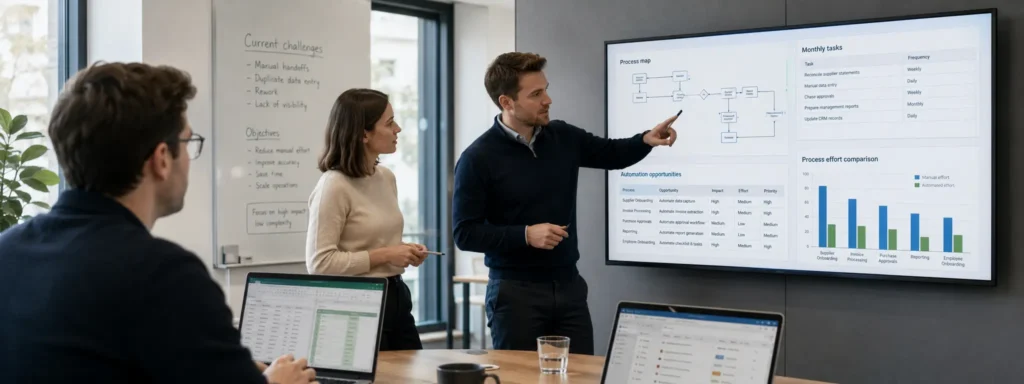
Capture triggers, roles, hand-offs, documents, systems, volumes, exceptions and common failure points.
Productivity pain analysis
Identify time lost through chasing, duplicated entry, waiting, rework, slow reporting and weak visibility.
Automation suitability assessment
Test whether each process is sufficiently stable, repeatable and rules-based to justify automation.
Indicative time and cost-value estimate
Use agreed volumes, effort assumptions and confidence levels to create a proportionate value range rather than a guaranteed ROI claim.
Microsoft 365 fit assessment
Consider whether existing Microsoft 365 capabilities could support the opportunity and flag obvious licence or integration constraints.
Risk and governance considerations
Identify visible concerns relating to data sensitivity, ownership, access, support and operational resilience.
Prioritised quick-win shortlist
Compare opportunities by productivity impact, feasibility, control improvement, practical risk and speed to value.
Do-not-automate-yet guidance
Call out processes that should be simplified, standardised or stopped before any build begins.
90-day automation roadmap
Set out what to do now, next and later, with one recommended first Quick-Win Sprint.
Decision-ready report
Receive an executive summary, opportunity register, indicative value view, risk notes and prioritised roadmap.
Leadership findings session
Use the final session to agree the first action, rather than simply receiving another report to review later.
Other Solutions
Microsoft 365 Security Baseline Review
Power Platform Governance & AI Readiness Review
Microsoft Entra Access Baseline Review
Unsure whether this assessment is the right starting point?
A short qualification conversation can determine whether the issue is process prioritisation, a Power Platform governance gap, a wider Microsoft 365 concern or a requirement that is already ready for implementation. Stygian will say when a different service is the better fit.
Stop guessing what to automate
Get a prioritised view of the manual work worth fixing now, what should wait and what is not suitable for automation yet.

Why Choose Stygian?
Move from automation ideas to a defensible first decision
Stygian combines business architecture, process analysis, Microsoft 365 automation and cybersecurity discipline. The result is a practical assessment that considers productivity, feasibility, control and risk before recommending a build.
Business-outcome led
The work starts with productivity loss and operational pressure, not a list of Microsoft product features.
Fixed scope and repeatable
The assessment is time-bound, limited to agreed functions and processes, and designed to reach a decision.
Risk-aware and proportionate
Data, access, ownership, licensing and support considerations are addressed without turning the work into a full audit.
Microsoft-aligned, not tool-led
Recommendations use Microsoft 365 automation where it is practical, but the assessment may recommend simplification or no automation.
Works alongside your MSP or IT team
Stygian can provide specialist process and automation assessment capability without replacing day-to-day IT support.
Clear next steps
Leadership receives one recommended Quick-Win Sprint and a sequenced roadmap rather than a vague list of ideas.
Best suited to organisations that
- have approximately 20–100 users and already use Microsoft 365;
- operate in professional services, property or construction services, or another regulated office-based environment;
- have one or two teams under visible administrative pressure;
- rely on spreadsheets, email, manual approvals, repeated data entry or informal tracking;
- can provide an engaged sponsor and relevant process owners;
- want a low-risk first step before committing to an automation build;
- need a practical way to compare several automation ideas and select one priority.
This service is not the right fit where
- the organisation expects a full transformation programme or detailed solution architecture within the assessment;
- the requirement is already fully specified and only build capacity is needed;
- there is no clear business pain, process owner or sponsor willing to support the work;
- a full Microsoft 365 security audit, Power Platform governance audit or regulatory compliance opinion is required;
- multiple complex ERP, CRM or bespoke-system integrations must be designed in detail;
- the client expects guaranteed savings, unrestricted process coverage or implementation to be included;
- stakeholders cannot provide examples, approximate volumes or enough time to validate the current process.
Frequently asked questions about the Automation Opportunity Assessment
What is an Automation Opportunity Assessment?
It is a structured, fixed-scope review that identifies where manual work is reducing productivity, assesses which processes are suitable for automation and prioritises the best Microsoft 365 quick win to implement first.
Which business processes can be assessed?
Common candidates include approvals, onboarding, document handling, request intake, compliance evidence collection, finance administration, HR administration, customer queries, case tracking and recurring reporting. A process must be repetitive, sufficiently stable and commercially meaningful to be a strong candidate.
How much of the business does the assessment cover?
The Focused option covers one function and up to three processes. The Standard option covers up to two functions and five processes. Complex processes may be assessed at opportunity level and recommended for separate discovery.
Do you need direct access to our Microsoft 365 tenant?
No. Guided screen-share and screenshots are the standard approach. Temporary direct access can be agreed separately where it is useful, proportionate and appropriately controlled.
Is this an IT or security audit?
No. It is a business productivity assessment supported by a lightweight Microsoft 365 readiness view. It does not replace a full Microsoft 365 security, licensing or Power Platform governance review.
How accurate are the time and cost-value estimates?
They are indicative ranges based on client-provided volumes, staff-time assumptions and the evidence available during the assessment. They support prioritisation and business discussion; they are not guaranteed savings or formal return-on-investment commitments.
Will Stygian build the automation during the assessment?
No. The assessment identifies what is worth automating first. The selected opportunity can then be implemented through a separately scoped Microsoft 365 Automation Quick-Win Sprint.
Can the assessment consider Power Apps, Copilot or AI agents?
Yes, where the business problem justifies them. The assessment remains outcome-led and may consider Power Automate, Power Apps, SharePoint, Teams, Microsoft Lists, Forms, Copilot or Copilot Studio. It will not recommend a more complex tool simply because it is available.
Can Stygian work with our existing MSP or IT provider?
Yes. The service is designed to complement internal IT teams and MSPs. They can provide technical context or participate in follow-on work while retaining the day-to-day support relationship.
How are the fees for the assessment calculated?
The Automation Opportunity Assessment is provided on a fixed-fee basis. The fee depends on the agreed package, number of departments, processes reviewed and any additional requirements. The full cost is confirmed in writing before the engagement begins, with no unapproved charges. Any implementation or work outside the agreed assessment scope is quoted separately.
What happens if none of the processes is worth automating?
The assessment may recommend simplifying, standardising or stopping a process before automation. A credible “do not automate yet” decision is preferable to building a weak solution.
What happens after the final report?
Leadership can proceed with the recommended Quick-Win Sprint, use the roadmap internally, engage another provider, defer the work or take no action. Where Stygian implements the solution, an optional support retainer can provide monitoring, fixes and controlled improvements after go-live.

Any Questions You Want to Ask?
Got queries about our Automation Opportunity Assessment? Our UK-based support team is available 24/7 to assist you. Reach out now for quick, expert answers.
Turn automation uncertainty into a practical priority
Before building another workflow, establish where the strongest productivity opportunity sits, whether the process is ready and what must happen first. Stygian provides a focused, independent assessment so leadership can proceed, defer or simplify with a clear rationale.
Find the manual work worth automating first
Book a 30-minute qualification call to confirm whether the Automation Opportunity Assessment is the right starting point for your organisation.

Blogs and Insights

AI Assurance Shouldn’t Be a Final Gate
The UK’s new AI Risk Management Toolkit points towards a better model: continuous AI assurance tied to services, architecture and real-world outcomes.

Legacy Is a Risk Problem, Not an Age Problem
GDS is rethinking the Service Standard around whole services. That should change how architects think about technology, operations and service outcomes.

Good Services Don’t End at the Digital Boundary
GDS is rethinking the Service Standard around whole services. That should change how architects think about technology, operations and service outcomes.